Guided fields
The screen presents the data required by the configured workflow and avoids repeating information already available.
Multas eBooklet · traffic enforcement
In one Android application, the officer starts the shift, identifies the vehicle through OCR, voice or keyboard, records the classification and evidence, reviews the traffic violation notice, works without continuous connectivity and synchronizes the record.
What it is
It is the application officers use to record and review a traffic violation notice in the field. Areatec Electronic Ticketing connects identity, vehicle data, classification, images, location, review, contingency and transmission to the environment defined by the authority.
The screen presents the data required by the configured workflow and avoids repeating information already available.
Images, location, date and time may accompany the notice when relevant, authorized and available.
The officer checks the plate, classification, notes and other fields before confirming the record.
Transmission follows the contracts, validations and rules agreed with the responsible authority.
How it works
The sequence keeps the event context visible and separates automated reading, professional review and decision. Fields, permissions and integrations follow each authority's procedure.
The officer signs in with the authorized method, selects the sector and checks the device, connectivity, printer and shift resources.
The plate can be entered through OCR, voice or a dedicated keyboard. The officer reviews the characters before continuing.
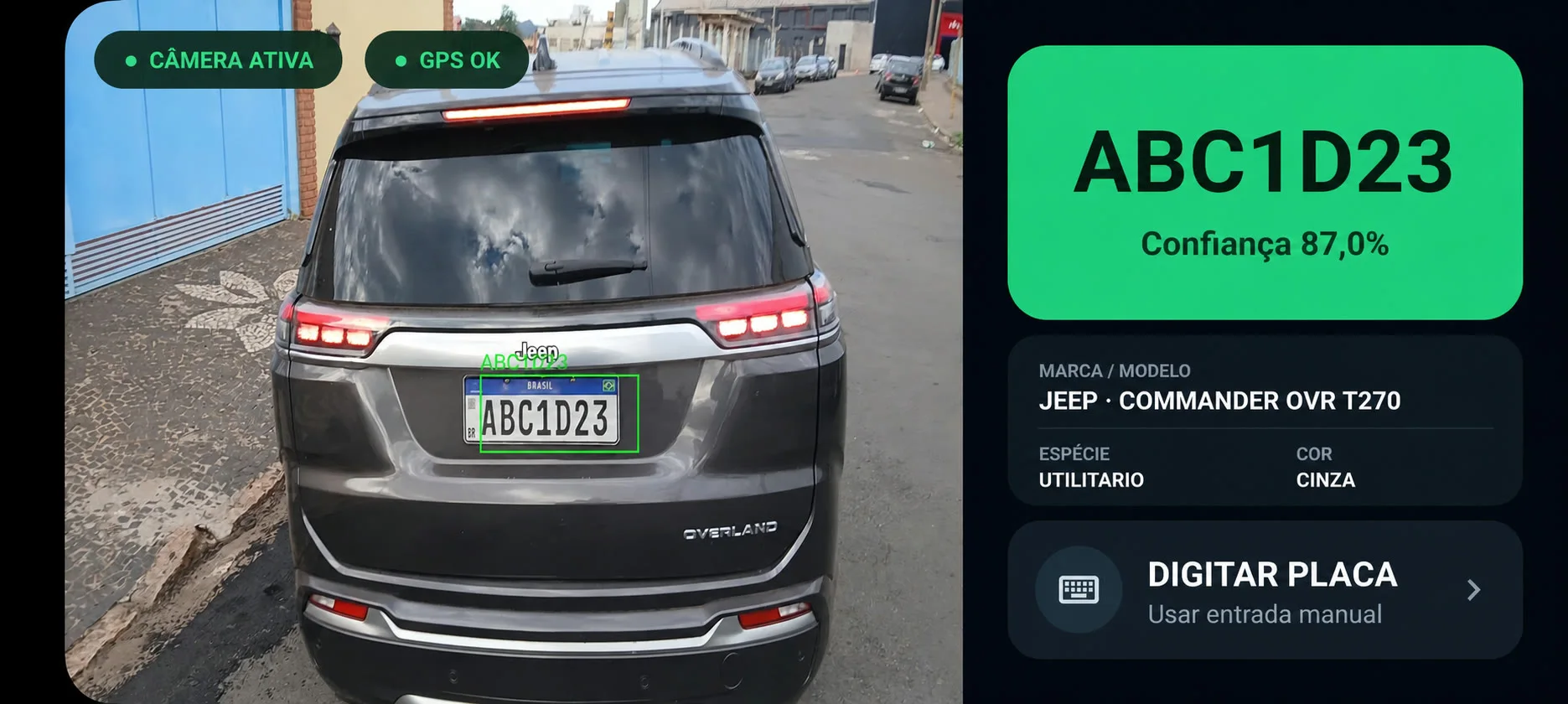
Proprietary OCR reads the plate and interprets make, model and color directly from the image, with confidence for each result.
The officer selects the classification, adds notes and gathers images, position, date and time when required by procedure.
The screen brings the notice fields together for correction and review. Confirmation remains with the competent officer.
The record is stored and sent to the authority's environment. Without continuous connectivity, synchronization resumes when the channel becomes available.
Artificial intelligence is useful when it helps identify inconsistencies and reduces repetitive work. It does not observe the event in place of the officer or turn a suggestion into a citation.
The operation in hand
Product screens show operational status, plate-input paths and where officer review is required. Navigation is organized for sunlight, noise, urgency and uneven connectivity.
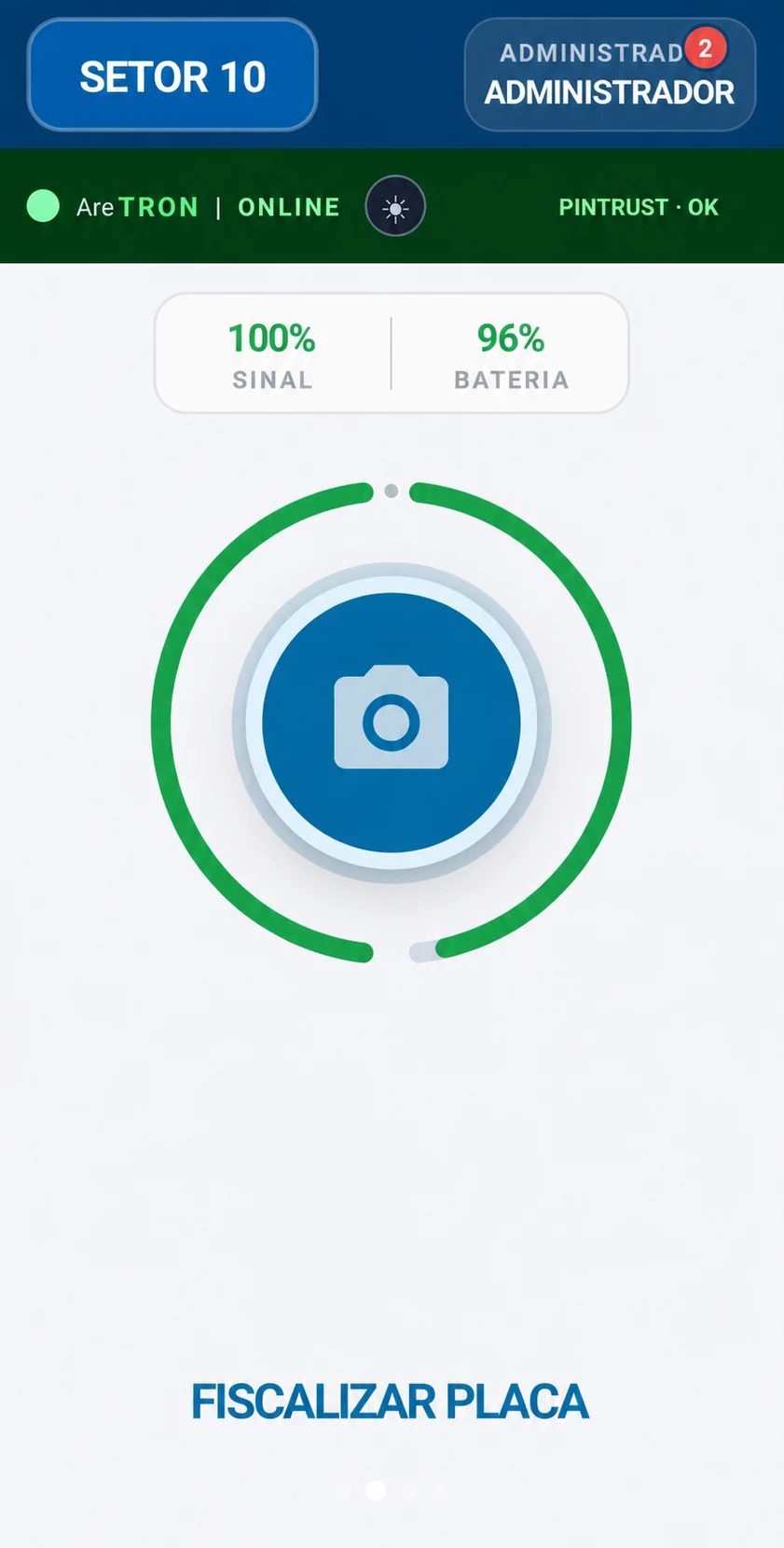
The header brings together officer, sector, connectivity, Aretron and Pintrust. Plate enforcement remains the central action.
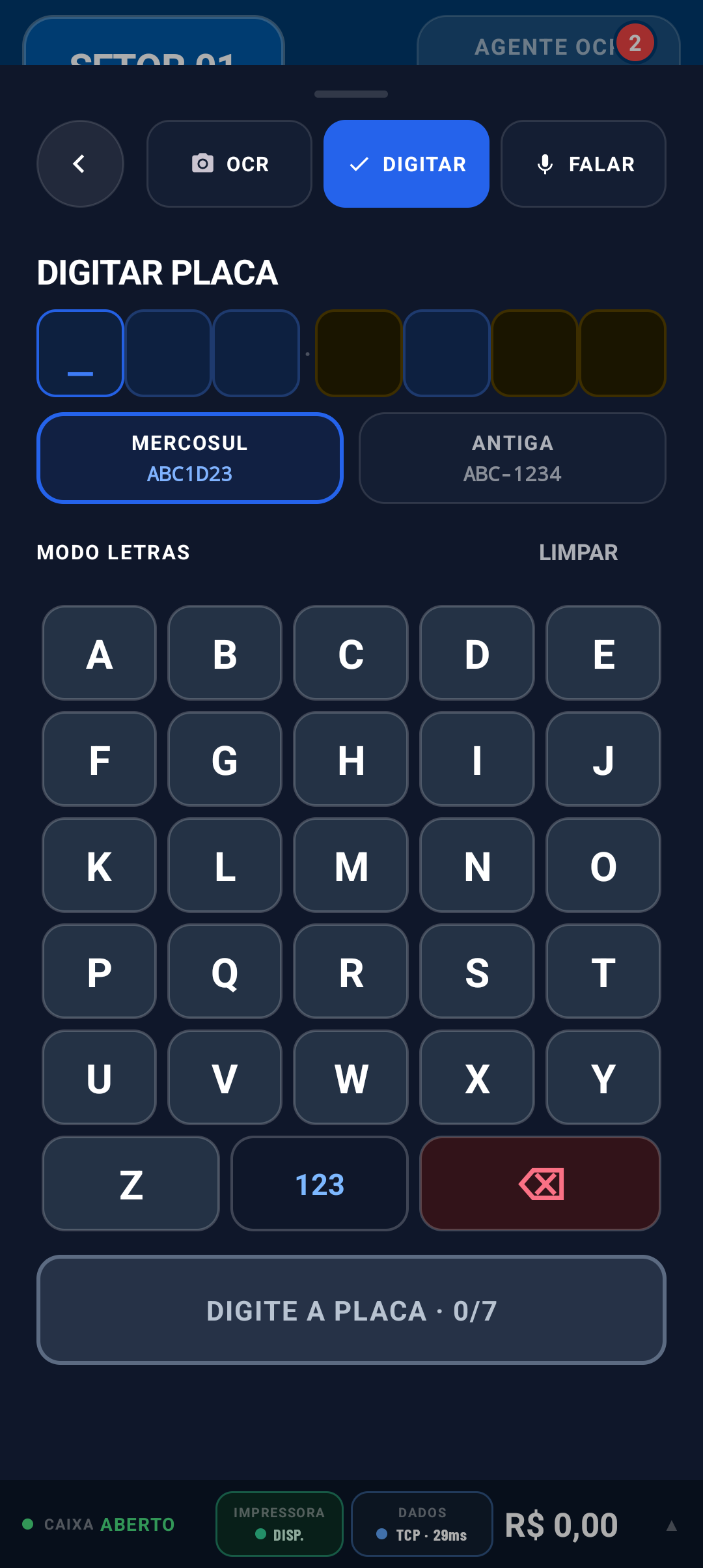
Large targets, contrast and direct switching between OCR, typing and voice reduce movement during plate review.
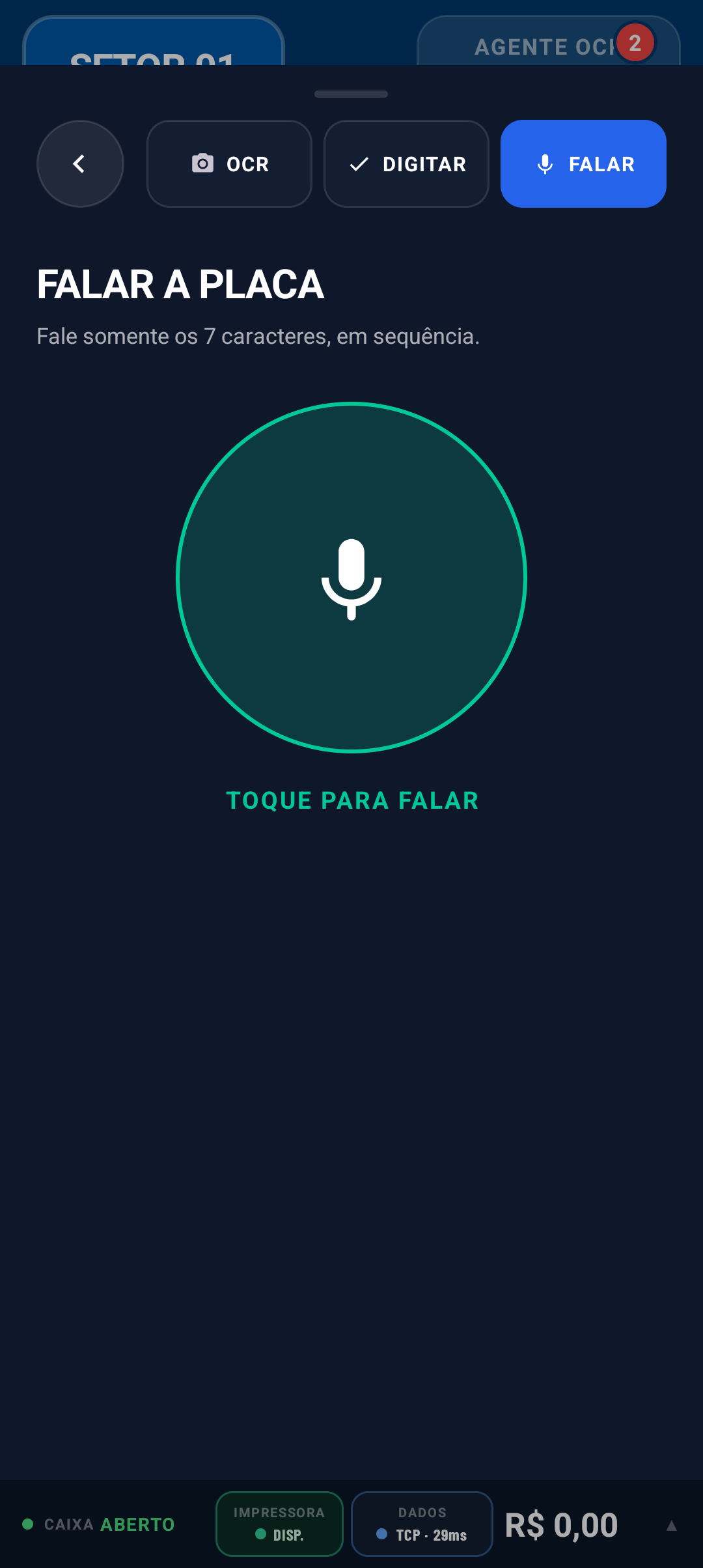
The officer speaks the characters and reviews the result before moving on.
Plate entry
Noise, light and connectivity change throughout a shift. The officer chooses the suitable input and always reviews all seven characters.
The camera can propose visible plate characters. The image and result follow the review required by the authority.
The private engine accepts natural speech, the radiotelephony spelling alphabet, such as Alfa, Bravo and Charlie, and mixed input. It considers regional pronunciation while keeping review on screen.
A dedicated keyboard provides large targets and separates letters, numbers and plate formats for gloves, haste or noisy environments.
Product evidence
Areatec's proprietary OCR reads characters on current-standard license plates and interprets the vehicle's visual attributes directly from the image: make, model and color. Each result retains its confidence score.
Plate, make, model and color in the same visual workflowIdentity and access
Officers can sign in through an image with liveness checks, a password or a graphical pattern. The authority's policy defines which methods are available for each profile and device.

The camera guides positioning and checks liveness signals before comparing the image with the officer's authorized reference.
Image sign-in
The officer enters a password on the device assigned to the operation and signs in with the permissions linked to that profile.

The officer draws the registered pattern on screen, a direct alternative for devices used in the field.
AUTHENTICATED GEOLOCATION
Pintrust compares the GNSS position with time, movement and signals from the device itself. Its state remains visible in the operation header and accompanies the context of each capture so the team can identify inconsistencies before proceeding. The result becomes part of the record; it does not replace officer review or turn location into standalone evidence.
Pintrust brings location context into the field screenIntelligent assistance
OCR may propose plate characters for officer review.
Rules may flag missing or incompatible data before submission.
The system may facilitate access to information required by the authorized workflow.
The officer remains responsible for observation, classification and confirmation.
Operational continuity
The application does not operate alone. Devices, peripherals, data transport and fleet administration are defined in the project to sustain field work.
Inventory, dedicated mode, policies, app distribution and updates, lock and remote wipe can be included in project administration.
Android models and accessories are assessed for camera, battery, durability, ergonomics, connectivity and management according to the operation.
Printer, camera, GNSS and other planned resources are monitored in the officer's operational view.
The proprietary protocol assesses network conditions and coordinates transport to reduce the impact of unstable connections.
DATARACEKeeps synchronization status visible and coordinates sending when connectivity becomes available again.
SYNCREALTIMEBeyond the notice
The authority may bring other field activities into the same environment. Each module retains its own form, permissions, evidence, destination and responsibility.
Records the vehicle, required images, tow vehicle, yard, location and removal events.
Organizes people, vehicles, witnesses, images and a diagram when applicable.
Documents guidance, support, occurrences and other field services.
Structures the document collection and registration defined by the authority, with protocol and traceability.
Formalizes commitments and signatures within the authorized procedure.
Records pre-operation inspection, mandatory items, photos and vehicle history.
Live operations
The product is part of traffic operations with different designs. These cases show how the officer workflow connects to each authority's systems and actual field routine.
Santo André · SP
Together with Sindata, Electronic Ticketing serves every municipal traffic officer and keeps 96 devices active in the field.
View the operationItajaí · SC
In the operation with Lapaza, 58 devices sustain the Electronic Traffic Ticketing system used by every city traffic officer.
View the operationTocantins · TO
Together with Panavídeo, Electronic Traffic Ticketing supports AGETO enforcement on state highways throughout Tocantins.
View the operationRibeirão Preto · SP
Three Olho Vivo Patrol vehicles and Olho Vivo City support enforcement; Electronic Ticketing completes review and, when applicable, notice issuance by the officer.
View the operationCabo Frio · RJ
Electronic Ticketing supports municipal enforcement in an operation that also includes Digipare and 43 Digicon parking meters.
View the operationPetrópolis · RJ
CPTrans officers use guided entry, plate lookup, evidence and transmission to the authority, including when the team works offline.
View the operationVolta Redonda · RJ
In the operation run with Sinalvida, Electronic Ticketing connects field work with 43 parking meters, points of sale, Digipare and one OCR vehicle.
View the operationDeployment and integration
Deployment defines the record's complete path: identity, parameters, storage, contingency, APIs, responses, failure handling and acceptance criteria.
Profiles, permissions and parameters link activity to the authorized user and context.
The project defines when to transmit, how to handle outages and how to prevent duplicate records.
Authorized people monitor queues, integration errors and relevant operational events.
Compatible APIs and contracts route data to the destination defined by the authority.
Public verification
SENATRAN Ordinance 984/2023 approves Multas eBooklet Version 2.1.0-A, developed by Areatec, for four years. Ordinance 997/2022 sets the requirements for Electronic Ticketing systems.
Frequently asked questions
The terms usually refer to the same digital traffic-violation workflow, although each authority may use its own name. The central requirement is to let the officer record, review, preserve and transmit the data required by the official procedure.
It is a system used by an officer to record a traffic violation notice on a portable device. It organizes the required fields, may collect images and location data, and transmits the record to the environment defined by the traffic authority.
Yes. SENATRAN Ordinance 984/2023 approves for four years the Multas eBooklet Version 2.1.0-A software developed by Areatec. The ordinance was published in Brazil's Federal Official Gazette on January 19, 2024.
Yes. SENATRAN Ordinance 997/2022 requires online and offline completion and storage of notices until transmission to the authority. The deployment defines synchronization, contingency, equipment and integrations for that workflow.
No. Aretron may assist with plate reading, field completion and consistency checks, depending on the contracted scope. Observation of the facts, classification, review and confirmation remain the responsibility of the officer and the competent authority.
It enables the paper pad and pen to be replaced in the workflow approved by the authority. The transition requires configuration, equipment, integration, training, contingency rules and the other procedures defined by the responsible authority.
Yes, when the systems involved provide compatible interfaces and contracts. Integration design should define data, validations, authentication, error handling, contingencies and responsibilities before deployment.
The timeline is defined after a technical assessment. The number of officers, devices, integrations, local rules, training, internal approvals and acceptance criteria all affect the schedule. The project proposal should document these dependencies.
The configuration may provide OCR capture, a field keyboard and voice. Officers may speak the seven characters, use the radiotelephony spelling alphabet, such as Alfa, Bravo and Charlie, or combine both forms. Every reading must be reviewed before proceeding.
Officers can sign in through an image with liveness checks, a password or a graphical pattern. The authority's policy defines which methods are available for each profile and device.
Yes, when device management is part of the project. Inventory, policies, dedicated mode, app distribution, updates, lock and remote wipe may be coordinated within the same operational design, with permissions and an administration trail.
Yes. Depending on scope, the platform may support vehicle removal, traffic accident reports, general service reports, CRDO, agreement terms and vehicle checklists. Each module keeps its own procedure, permissions and integrations.
Tell us which teams, devices, peripherals, systems and procedures take part in the operation. The demonstration will be organized around that scenario.